Hello, World!
So for over 5 years I have had space online served via GitHub pages. It has not been updated in forever. Time for a change.
This blog is mainly a dumping ground for experiments, knowledge gained and useful references for anything related to secure software development. It is also a place for me to actively experiment and build knowledge in some areas that I need to use less of in my day-to-day work. For example, getting over my fear of CSS.
At work, we recently started using Netlify for some of our sites, and I have been impressed with how easy it is to get a powerful build pipeline and workflow. Netlify comes with some great things out of the box:
- One-click CMS deployment
- GitHub based workflow
- Managed HTTPS
- CI/CD
- Great plugin directory
- Solid free tier
Getting started
I used the one-click-hugo-cms template this set up a full CD pipeline tied to my repository within GitHub. Using yarn you can quickly get local development setup and start making it your own.
Stripping back
The template comes with a pretty basic web CMS built-in, but I like working in a more hands-on way, I will be making changes locally checking them over and pushing them to GitHub, so I pulled out the CMS features by deleting a few files and references.
The template comes with some great examples of content agnostic partials and pages that give you a feel for how to use them. Once I had looked around I stripped back the layouts and removed the placeholder content.
The site also came with a custom fork of a CSS framework. Now I plan to use this site as an opportunity to build full confidence in working with CSS, so I pulled it all to implement my super basic styles as holding code for me to build out from the ground up when I get more time.
I took a look around for simple and clean blog examples and came across orderedlist.com which I used as a guide to get me started.
CI
At this point as I started to develop the building blocks for the blog, I took advantage of another very cool Netlify feature build-plugins. I wanted to ensure that I stick fairly close to some best practices whilst iterating on the content and to add in any useful QOL improvements at the same time.
The first plugin that I installed was Lighthouse. I am a big fan of this tool and highly recommend including it in your build pipelines. We recently set this up for another project I work on, and it required a bit of work, but with Netlify it’s a one-click setup with straightforward configuration. This highlighted numerous issues with the code that I needed to work through.
Performance
So right at the beginning of this process, I was very clear that I did not want to use anything that would get in the way or add additional burden to the performance of what is a very simple static site. I did not want to use a heavy frontend framework or library I felt like this would require no JS at all. By removing the admin features that I did not need at this point I was not far off.
Netlify also comes with a heavily cached CDN and great default settings that help maximise the performance of the site, and again this is a super simple blog, I had very little to do to get this to an acceptable level of performance.
I did add image-optim for a quick and basic pass on optimising images for the web, I know there is potentially more I can do here but not something I care too much about at this point.
Accessibility
A great example of an accessibility issue that I didn’t think about was low contrast text.
Text that has a low contrast ratio—that is, text whose brightness is too close to the background brightness—can be hard to read.
To help fix this I used the dev tools color picker which made my life easier.
I also added html-validate and the a11y plugin to help lockdown accessibility issues.
Still more to do here, and I plan to invest some time to go over the checks that can’t easily be automated.
SEO
Primarily I focus on backend development, SEO is something I rarely come close to, and I realise this a deep subject with lots more I can do but Lighthouse gave me a good baseline to work with.
I am not massively trying to promote this site but if and when I do share a link to a post, I want that link to look great. I took some time to implement open graph tags by adding the following to layouts\partials\head.html
{{ $base := "/" }}
{{ if (eq "production" (getenv "CONTEXT")) }}
{{ $base = (getenv "URL") }}
{{ else if (eq "deploy-preview" (getenv "CONTEXT")) }}
{{ $base = (getenv "DEPLOY_PRIME_URL") }}
{{ else }}
{{ $base = $.Site.BaseURL }}
{{ end }}
<!-- Open Graph -->
<meta property="og:type" content="website">
<meta property="og:title" content="{{.Title}}">
<meta property="og:url" content="{{$base}}">
<meta property="og:image" content="{{$base}}{{.Params.thumbnail}}">
<meta property="og:description" content="{{ .Description }}">
Title and Description are predefined variables you can control using front matter and Hugo also supports user params, so I added a thumbnail concept. You
may also notice the $base variable being used in URLs. I decided to add this to ensure that we have the correct URL in all environments and yes due to the way
hugo works the initialisation of $base is required.
You can review your tags using https://www.opengraph.xyz/ and I built my thumbnails using the free tier for Canva
Ready to deploy
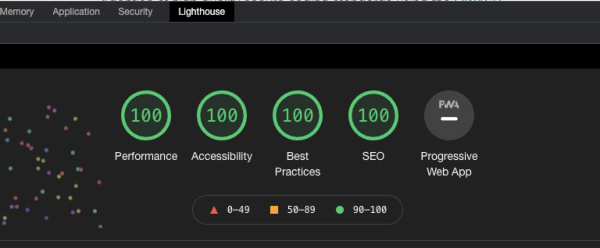
A few more tweaks later, and the sites scores are looking good. Netlify comes with a free managed HTTPS certificate setup, this means I don’t have to worry about a certificate expiring in a year. At the moment I am happy to go with a Netlify based URL for this content but in the future, if I want to I can register my domain.
We are ready for final review and deployment, and this is where Netlify really shines for this type of project. Deployment previews are so useful and this functionality is expanding.
So for every post I work on, I will create a branch, develop it locally and then when I am ready for a final review I can create a pull request and Netlify will give me a URL that I can preview the content and share with others. Once I am happy with the content, I can push to the main site by merging the PR and within a few minutes, my content is live.
Wrapping up
I have enjoyed working with this Netlify setup. It allows me to work in a way I am familiar with and provides very little friction. I have content that is delivered in a secure, accessible and performant manner.
There is work still to be done, I am not hugely keen on keeping post static content such as images in my repository, so I may eventually add a solution to move those out. I have only built a very simple HTML/CSS setup, so I will look at learning more and improving this in the future.
For now, I am happy, and I can get on with expanding the content I am interested in. My next few posts will be looking over some tools and processes that can help build a better Secure Software Development Life Cycle.